
Driver link
Does your carrier work without a system of its own, or do you drive yourself? Then you send the driver a link per shipment. They open it on their phone, without an app and without an account, and tap what happens. Every tap appears in the shipment’s history, on the Shipping page and on your customer’s tracking page.
Making a driver link
Section titled “Making a driver link”- Register the shipment with the carrier if you haven’t yet (see Pier).
- Expand the shipment on the Shipping page or under Shipments on the order.
- Click Driver link.
- On a phone you pick an app to share the link right away, for example WhatsApp; on a computer the link is copied and you paste it into a message yourself.
There is always one driver per shipment: if you make a new link, the previous one stops working. A link works for seven days, and stops as soon as the shipment is delivered, returned or cancelled. Because the link shows the delivery address, send it to the driver only.
What the driver sees
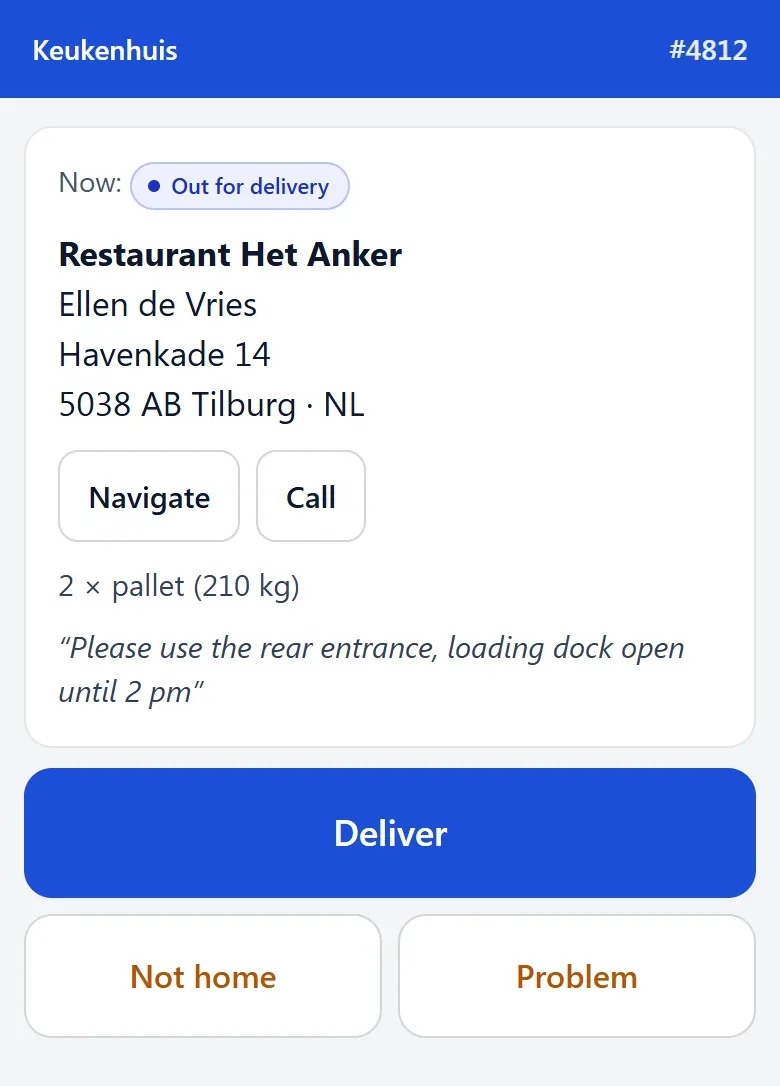
Section titled “What the driver sees”At the top are your shop’s name and the order number. Below that:
- the current status (Now);
- the delivery address, with a Navigate button and, if you share the receiver’s phone number, Call;
- the packages, for example “2 × pallet (210 kg)”, and the delivery note.
And the buttons:
| Button | What it reports |
|---|---|
| Picked up | The goods have been collected (only while the shipment is booked). |
| On my way | The driver is on the way to the receiver. |
| Deliver | Opens the delivery, see below. |
| Not home | Nobody was there. The driver fills in what happened. |
| Problem | Damage, wrong address, no access. The driver fills in what happened. |
If the phone allows it, the location is sent along. Your customer’s tracking page never shows a GPS position.
Delivering with proof
Section titled “Delivering with proof”A delivery only counts with proof:
- The driver taps Deliver.
- They fill in the Name of who takes it in.
- They tap Take a photo, or let the receiver sign under Signature and tap Save signature. One of the two is enough; both is fine too.
- They tap Delivered.
Without a name and a photo or signature the button stays off and they see Fill in the name and take a photo or get a signature.
You see the photos and signatures in the shipment’s history, with the name, the time and whether a location was attached. Your customer sees them on their tracking page under Proof of delivery. Teamdock keeps photos and signatures for 180 days and then deletes them.
Troubleshooting
Section titled “Troubleshooting”- The driver sees “This link does not work (any more)”. The link has expired, been replaced by a new one, or the shipment has already been delivered. Make a new link if needed.
- The Driver link button is missing. The shipment is not with a Pier carrier, has already been delivered, or your plan is Essentials.
- No Call button. Tick Send the receiver’s phone number along (to call ahead) for the carrier under Settings → Shipping → Other carriers → Details.